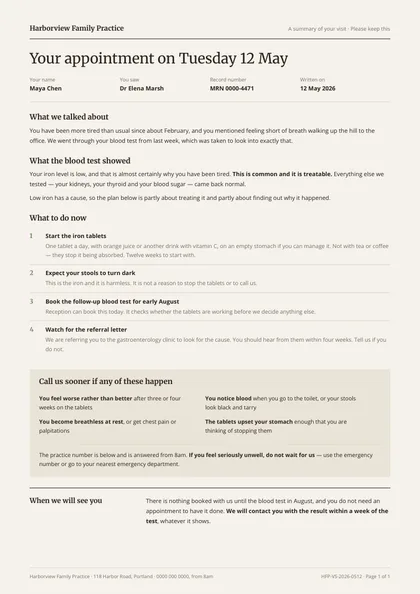
Minimal, type-led · Espresso & sage · Merriweather + Open Sans
refined A4 portrait 1 page
See the full document
Use this template
Healthcare
A visit summary is written once and read by two different people — the patient at home and the next clinician to open the record. These layouts separate the two: plain language and a large measure for one, a structured note for the other.
3 designs, each a separate take on the same document rather than a recolour of one layout: Minimal, type-led, Two-column magazine and Boxed form planner. Every preview below is the actual compiled output, not a mock-up.
Open one in the editor and render it from your own JSON over the API — 1 page of A4 portrait, the same engine either way.
Minimal, type-led · Espresso & sage · Merriweather + Open Sans
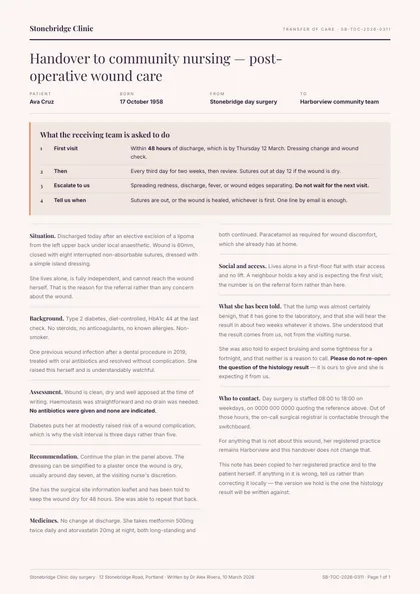
Two-column magazine · Aubergine & peach · Playfair Display + Inter
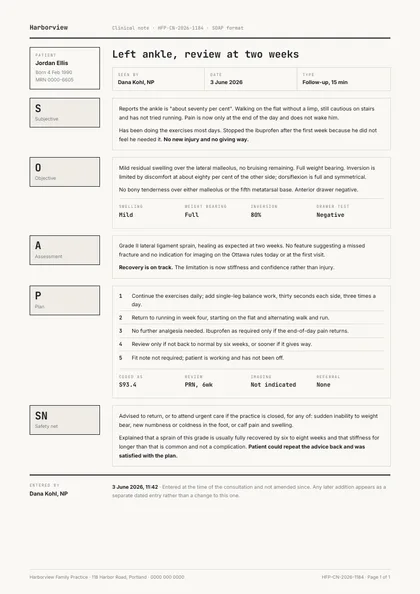
Boxed form planner · Ink & cream · JetBrains Mono + Inter
Same document, same data model, 3 different arguments about how it should look on paper. Pick on layout and typography — the content behaves identically.
| Design | Layout | Palette | Typefaces | Pages |
|---|---|---|---|---|
| After Visit | Minimal, type-led | Espresso & sage | Merriweather + Open Sans | 1 · A4 portrait |
| Care Handoff | Two-column magazine | Aubergine & peach | Playfair Display + Inter | 1 · A4 portrait |
| Soap Note | Boxed form planner | Ink & cream | JetBrains Mono + Inter | 1 · A4 portrait |
Each design is authored against an explicit reflow contract, so it is defined up front which blocks are emitted once per record and which fields absorb longer content. That is what stops the layout falling apart at a hundred rows.
| Design | Repeats per record | Grows with your data |
|---|---|---|
| After Visit | the things-to-do rows; the medicine rows; the reasons-to-call rows | every section's prose; any medicine instruction that wraps |
| Care Handoff | the handover's sections down the two columns; the action rows in the head panel | every section's prose; the actions; the contact lines |
| Soap Note | the four note sections down the measure, each with its letter hung in the margin; the observation rows; the plan rows | every section's prose; the plan; the coded problem list |
These document sets each include the visit summary designs above.
Open a design in the editor and the agent reshapes it around your schema — then render it from your own data over the API, or let your users edit it in the embedded editor.